Kitchen Island With Seating: Dimensions, Cost, and Planning
By Noah James
• 8 min read • Founder, DrivewAI
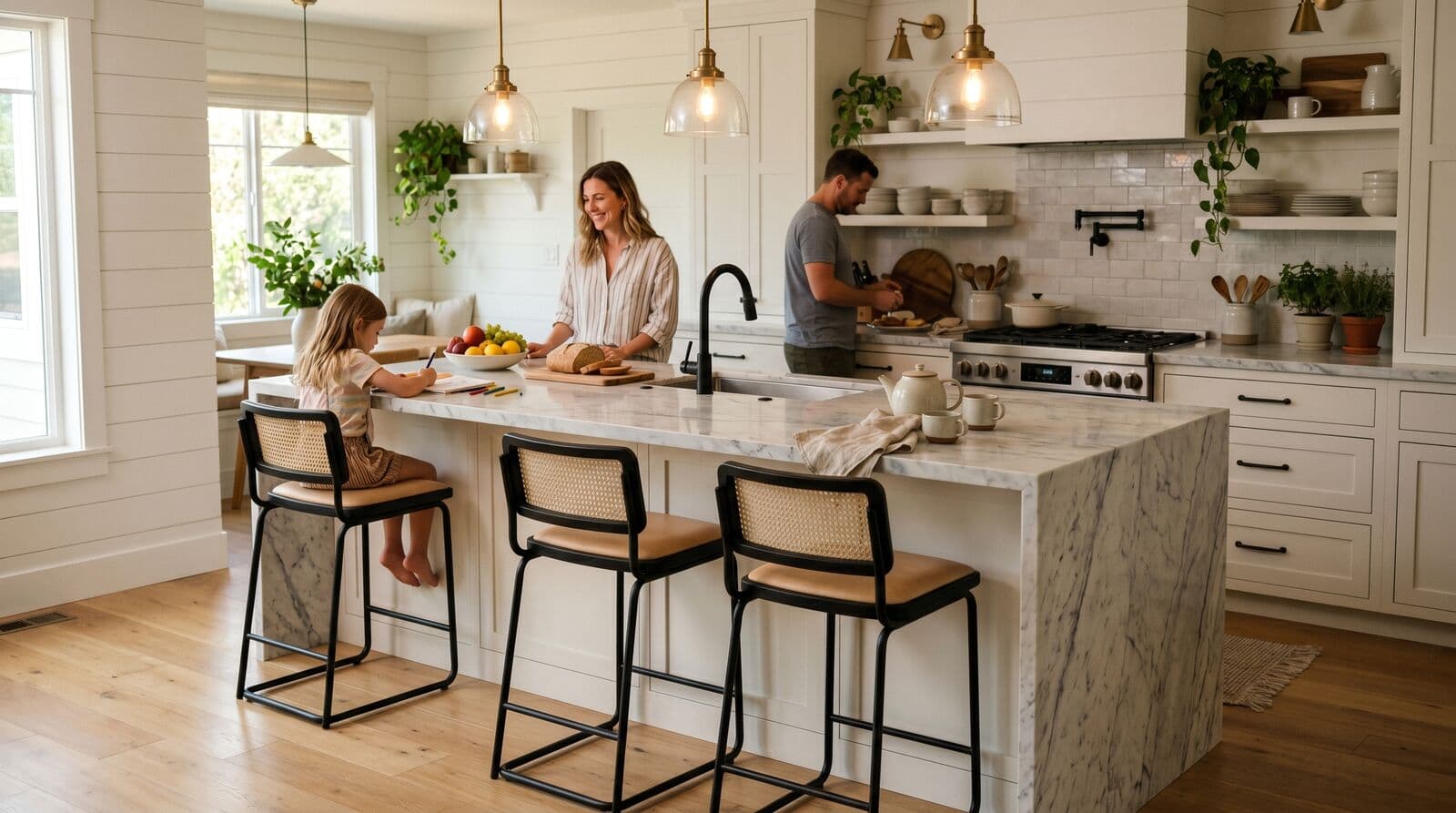
The kitchen island with seating has become the centerpiece of American kitchen design. It's where kids do homework, where guests sit while you cook, and where you eat 80 percent of your meals because the dining table has become a permanent home for mail and laptop chargers. The island earns its keep — when it's sized correctly. When it's not, it's an expensive obstruction that makes your kitchen worse.
I've seen too many kitchens where the island was added because "kitchens are supposed to have islands now" without anyone measuring whether the room could actually support one. The result is a kitchen where you can't open the dishwasher without bumping the island, where the stools block the walkway, and where the entire cooking zone feels cramped. Let's make sure that doesn't happen to you.
Minimum Island Dimensions for Seating
A kitchen island with seating needs to be large enough to serve two purposes: work surface and eating area. These purposes compete for space, which is why minimum dimensions matter more here than with any other kitchen element.
Bare minimum island size: 36 inches wide by 60 inches long (3 feet by 5 feet). This gives you a usable work surface and room for two stools on one side. It's tight — you'll feel it — but it's functional.
Comfortable island size: 42 inches wide by 72 inches long (3.5 feet by 6 feet). This accommodates three stools comfortably and leaves enough depth for a work surface on the opposite side. The extra 6 inches of width makes a noticeable difference in how usable the work side feels.
Generous island size: 48 inches wide by 84 to 96 inches long (4 feet by 7 to 8 feet). This is where you can seat four comfortably, potentially add a sink or cooktop, and still have ample prep space. But an island this size demands a large kitchen — you need the clearances to match.
The width measurement is critical because it has to serve double duty. The overhang for seating eats into the total width. On a 36-inch-wide island with a 12-inch overhang, you only have 24 inches of usable work surface on top — enough for a cutting board but not much else.
Overhang Requirements by Stool Height
The overhang is the part of the countertop that extends beyond the cabinet base, creating knee space for stools. Get this wrong and your stools either don't fit under the counter or your guests' knees hit the cabinet face.
Counter-height seating (36-inch counter, 24 to 26-inch stools): You need 10 to 12 inches of overhang. This is the standard kitchen counter height and uses shorter stools. It's the most comfortable option for eating actual meals because the surface is at a natural table-like height.
Bar-height seating (42-inch counter, 28 to 30-inch stools): You need 12 to 15 inches of overhang. Bar-height counters are taller than standard and require taller stools with footrests. The greater overhang is necessary because legs extend further forward at a higher seating position. Bar height is popular for islands that face a living area — the raised counter hides kitchen mess from sight.
A critical detail most people miss: Any overhang beyond 10 to 12 inches without support will flex and eventually crack, especially with stone countertops. Overhangs of 12 inches or more need support brackets, corbels, or a steel support bar embedded in the countertop. Budget $200 to $500 for proper support hardware. Skipping this to save money is how you end up with a cracked countertop corner three years later.
Stool spacing: Allow 24 to 28 inches of width per stool, measured center to center. Stools with arms need 28 to 30 inches. Stools without arms can squeeze into 24 inches, but 26 is more comfortable. The NKBA recommends 24 inches minimum per seated position for residential kitchens.
The Outlet You Will Wish You Had Added
Here's the planning detail that separates kitchen islands that work from kitchen islands that frustrate: electrical outlets.
The National Electrical Code requires at least one outlet in a kitchen island with a countertop wider than 12 inches and longer than 24 inches. But code minimum and practical minimum are different. You want at least two outlets, and ideally three or four — one or two on the working side for small appliances, and one or two on the seating side for charging phones and laptops.
Pop-up outlets mount flush with the countertop and spring up when you need them. They look clean and don't interrupt the counter edge. Cost: $80 to $200 per unit plus installation.
Under-counter outlets mount horizontally under the countertop lip. They're less visible than standard wall outlets but can be hard to reach. These work well on the seating side where people charge devices.
Standard outlets mounted in the island cabinet face. The cheapest option and the easiest to install, but they're visible and can look industrial. A cover plate that matches your cabinet color helps.
If your island will have a sink or dishwasher, you'll also need a dedicated 20-amp circuit for the dishwasher and possibly a garbage disposal. This is not optional — it's code. Plan this before construction, because adding electrical to a finished island means cutting into the countertop, cabinets, and potentially the floor.
What It Costs to Add a Kitchen Island
The cost of a kitchen island with seating ranges enormously depending on whether you're talking about a simple cabinet-and-countertop assembly or a fully plumbed island with a sink and seating for four.
Basic island (no plumbing, no electrical): $3,000 to $6,000. This is a cabinet base with a countertop, no sink, and electrical run from the floor. Stock cabinets from a home center with a quartz or granite top. You're paying mostly for the countertop fabrication and the floor electrical run.
Mid-range island (electrical, basic features): $6,000 to $10,000. This adds better cabinetry (semi-custom), a waterfall edge or more elaborate countertop, and dedicated electrical circuits. Maybe a wine fridge or microwave drawer in the base.
Full-featured island (sink, dishwasher, seating): $10,000 to $15,000 or more. Adding a sink to an island means running water supply and drain lines through the floor, which can cost $2,000 to $5,000 alone depending on how far the island is from existing plumbing. A dishwasher adds another dedicated circuit. At this level, the island is essentially a second kitchen station.
The hidden cost: Floor work. Unless your kitchen is on a concrete slab with accessible plumbing, running water and electrical to an island means cutting into the subfloor. In a home with a basement or crawl space, this is relatively straightforward. In a slab-on-grade home, it means cutting concrete — adding $1,500 to $3,000 to the project. Make sure your contractor quotes the floor work explicitly, because it's often listed as an "allowance" that ends up costing more than estimated.
When Your Kitchen Is Too Small for an Island
This is the section nobody wants to read, but it might save you from a $10,000 mistake.
The honest answer: if your kitchen is under 12 feet by 12 feet total, a permanent island will probably make it worse. Here's why. A usable island with seating is at minimum 36 by 60 inches — that's 3 by 5 feet of floor space consumed. Then add 42 inches of clearance on all working sides (the minimum needed to open appliance doors and walk past). Your island plus clearances eat up roughly 10 by 9 feet of floor space. In a 12x12 kitchen, that leaves almost nothing.
Under 12x12: Consider a peninsula (attached to a wall or cabinet run on one end) instead. Peninsulas give you the seating and extra counter space of an island without eating as much floor space, and they don't require floor-based electrical or plumbing runs. A peninsula costs 30 to 50 percent less than a comparable island because one side attaches to existing infrastructure.
Under 10x10: A movable butcher block cart ($200 to $600) gives you extra prep surface when cooking and can be pushed against a wall when you need the floor space. It won't seat four people, but it solves the prep space problem without permanent construction.
The test: Tape the island dimensions on your kitchen floor with painter's tape. Include the stool positions. Live with it for a week, cooking and moving through the kitchen normally. If you keep walking into the tape boundaries or feeling cramped, your kitchen is telling you something. Listen to it.
Island Features Worth the Money (and Features That Aren't)
Worth it:
- Electrical outlets on the seating side. People will charge phones at your island constantly. Make it easy. - A deep pot drawer on the working side. One large drawer for pots is more useful than two small cabinets with shelves. - Waterfall countertop on the seating end. This protects the exposed cabinet end from kicks, scuffs, and stool damage. It's cosmetic, but the protection is functional. Adds $500 to $1,500 depending on material. - Task lighting directly above. Two or three pendants or a recessed light bar ensure the work surface is well-lit independent of the room's general lighting.
Not worth it for most people:
- A cooktop in the island. Requires a vent hood above (which blocks sight lines in an open plan) or a downdraft vent (which works poorly with high-BTU burners). It also means running a gas line through the floor if you use gas. The cost and complexity rarely justify the marginal workflow improvement. - A second sink in the island. Unless you regularly have two people doing serious cooking simultaneously, a prep sink adds plumbing cost ($2,000 to $5,000) for something you could solve with a colander and a cutting board. - Built-in wine fridges. They sound luxurious. In practice, a 15-inch under-counter wine fridge holds 24 to 34 bottles and costs $800 to $2,000 installed. A freestanding wine fridge of the same capacity costs $200 to $500 and can go anywhere. The built-in only makes sense if you genuinely need the counter and floor space it saves.
See Your Island Before You Build It
A kitchen island with seating is one of the most impactful changes you can make to a kitchen, but it's also one of the hardest to undo. Ripping out an island means patching the floor, rerouting plumbing and electrical, and living through a second round of construction.
Before committing, upload a photo of your kitchen to our AI staging tool and see how an island fits in your actual space. You can test different sizes, counter materials, and configurations without the commitment. Pair it with our kitchen layout guide to make sure the island works with your overall flow, and check our countertop comparison to pick the right surface for an island that takes daily abuse from eating, homework, and cooking prep. Customized renders start at $9.00 each.
About the author
Noah James
Founder, DrivewAI
Noah James is the founder of DrivewAI, an AI home visualization platform that helps homeowners, contractors, and real estate agents preview renovations before committing. He built DrivewAI to close the gap between inspiration and execution in home improvement.
His writing focuses on practical renovation decision-making, material comparisons, and how AI visualization tools are changing the way people plan projects — from driveway replacements to full interior staging.
See your kitchen restyled by AI
Upload a photo and get AI renderings across every style. Designs from $9 with a 24-hour refund guarantee.
Try DrivewAI Free